How to extract calendar events and links from unstructured emails
How to extract calendar events and links from unstructured emails
Parsing back-and-forth email threads to schedule meetings introduces unnecessary friction. When a client or colleague sends a block of unstructured text proposing times and dropping multiple video conferencing links across nested replies, manually copying those details into Google Calendar disrupts your workflow and invites data entry errors.
You need a reliable method to create calendar event from email text automatically, extracting the correct datetime coordinates and meeting URLs without leaving the inbox.
The operational cost of manual scheduling
Transferring meeting details from an email thread to a calendar app requires multiple context switches:
- Scanning paragraphs to identify the final agreed-upon time and timezone.
- Locating the correct meeting link (Zoom, Google Meet, or Microsoft Teams) buried in previous replies.
- Switching to your calendar application to create the event.
- Manually pasting the title, description, time, and URL.
This manual data parsing is error-prone. A missed timezone conversion or a copied expired Zoom link results in missed meetings. While tools like Calendly handle initial scheduling well, they do not help when a meeting is organically negotiated in plain text within a thread.
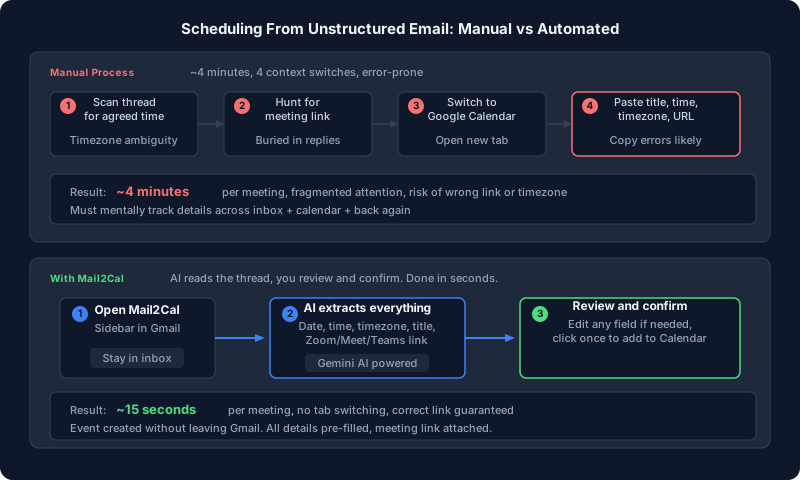 Comparing the traditional multi-step scheduling workflow with an automated extraction process.
Automating extraction with Mail2Cal
Instead of manual data entry, you can leverage Gemini AI directly inside Gmail to parse the unstructured text. Mail2Cal is a free Gmail add-on designed specifically to read complex threads, identify the final scheduling parameters, and generate the corresponding calendar event.
1. Parsing dates and timezones
Emails rarely use standard datetime formats. A sender might write, “Let’s meet tomorrow at 3 PM EST.” Mail2Cal’s AI engine interprets relative dates (“tomorrow”, “next Tuesday”) based on the email’s timestamp and normalizes the target timezone against your local Google Calendar settings.
2. Identifying meeting links
Threaded replies often contain multiple overlapping signatures and meeting links. Mail2Cal scans the entire context to extract the relevant active meeting URL, supporting standard providers:
- Zoom (
zoom.us/j/...) - Google Meet (
meet.google.com/...) - Microsoft Teams (
teams.microsoft.com/...)
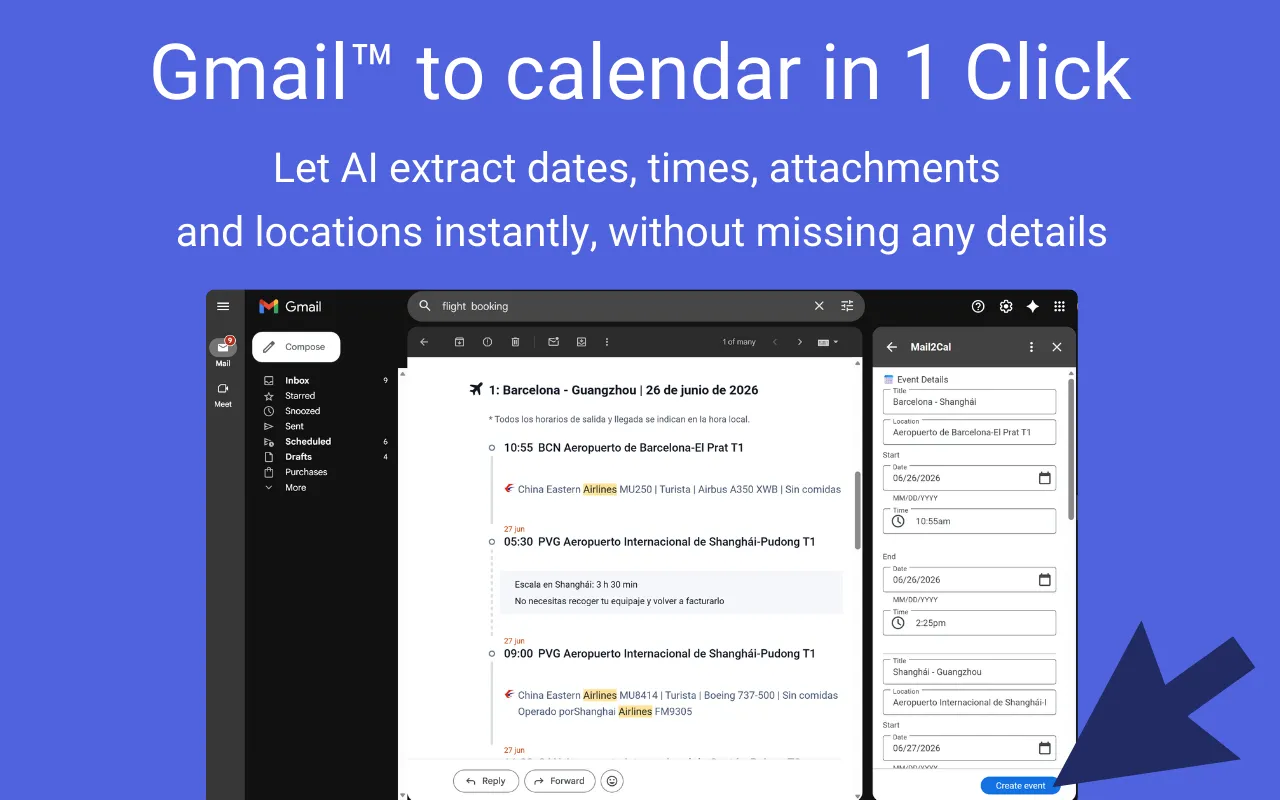 Mail2Cal identifying the correct meeting time, timezone, and Zoom link from a conversational email thread.
3. One-click event generation
Once the AI extracts the structured data from the unstructured text, it stages a draft event within the Gmail sidebar. You can review the title, time, and link, then click once to commit the event to your Google Calendar. This eliminates the need to open a new tab or copy-paste text.
For workflows involving invoices or financial documents rather than meetings, you might use our data extraction tool for ledgers to route data elsewhere. But for scheduling, keeping the interaction confined to the inbox is the most efficient path.
Ready to try?
Reclaim the time lost to copying and pasting meeting details. Mail2Cal analyzes your threads and stages the calendar event for you directly within the Gmail interface.
Install Mail2Cal from the Google Workspace Marketplace (Free)