How to extract PDF invoice data directly to Google Sheets
How to extract PDF invoice data directly to Google Sheets
Manual data entry from PDF attachments into spreadsheets causes delays, transcription errors, and accounting bottlenecks. Traditional OCR (Optical Character Recognition) tools attempt to solve this but struggle with unstructured layouts. They often require strict template mapping, expensive subscriptions, and brittle middleware like Zapier to route the parsed data into your accounting workbook.
Transitioning to a generative AI approach inside your inbox eliminates the need for complex middleware and template configuration.
The limitations of traditional OCR workflows
Standard invoice processing relies on coordinate-based OCR or rigid templating APIs. This presents two primary operational roadblocks for small teams and freelancers:
1. Template dependency
OCR systems break when a vendor changes their invoice layout. If the “Total Due” field shifts 20 pixels down, coordinate-based parsers capture the wrong data. You must maintain a library of vendor-specific templates to ensure accurate extraction.
2. The middleware tax
Extracting the data is only the first step; moving it requires integration. Connecting an OCR API to Google Sheets usually demands Zapier or Make.com workflows. This introduces maintenance overhead, synchronization errors, and recurring subscription costs for workflow task execution.
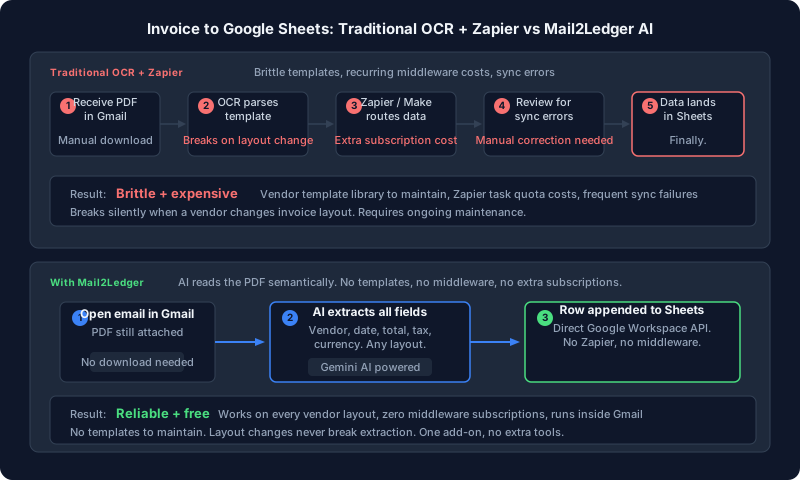 Comparison of traditional middleware-heavy OCR processing versus direct AI extraction from the inbox.
Using a free ai invoice extractor for gmail to google sheets
Mail2Ledger is a native Gmail add-on that bypasses OCR templating by leveraging generative AI. It reads the semantic context of a PDF receipt or invoice securely within your inbox, identifies key financial entities, and appends them as new rows to a designated Google Sheet.
Generative AI extraction accuracy
Unlike OCR text-dumping, generative AI understands accounting schemas. It accurately identifies and categorizes:
- Vendor names
- Invoice dates
- Total amounts
- Tax line items (e.g., VAT, GST, Sales Tax)
- Currency types
The model successfully parses diverse document structures—from highly formatted enterprise invoices to unstructured restaurant receipts—without requiring pre-configured templates.
Direct Google Sheets syncing
Mail2Ledger writes the JSON output directly to your Google Sheets via the Google Workspace API. Because it operates as a native add-on, it authenticates automatically with your existing Google account. This direct integration removes Zapier from the architecture entirely.
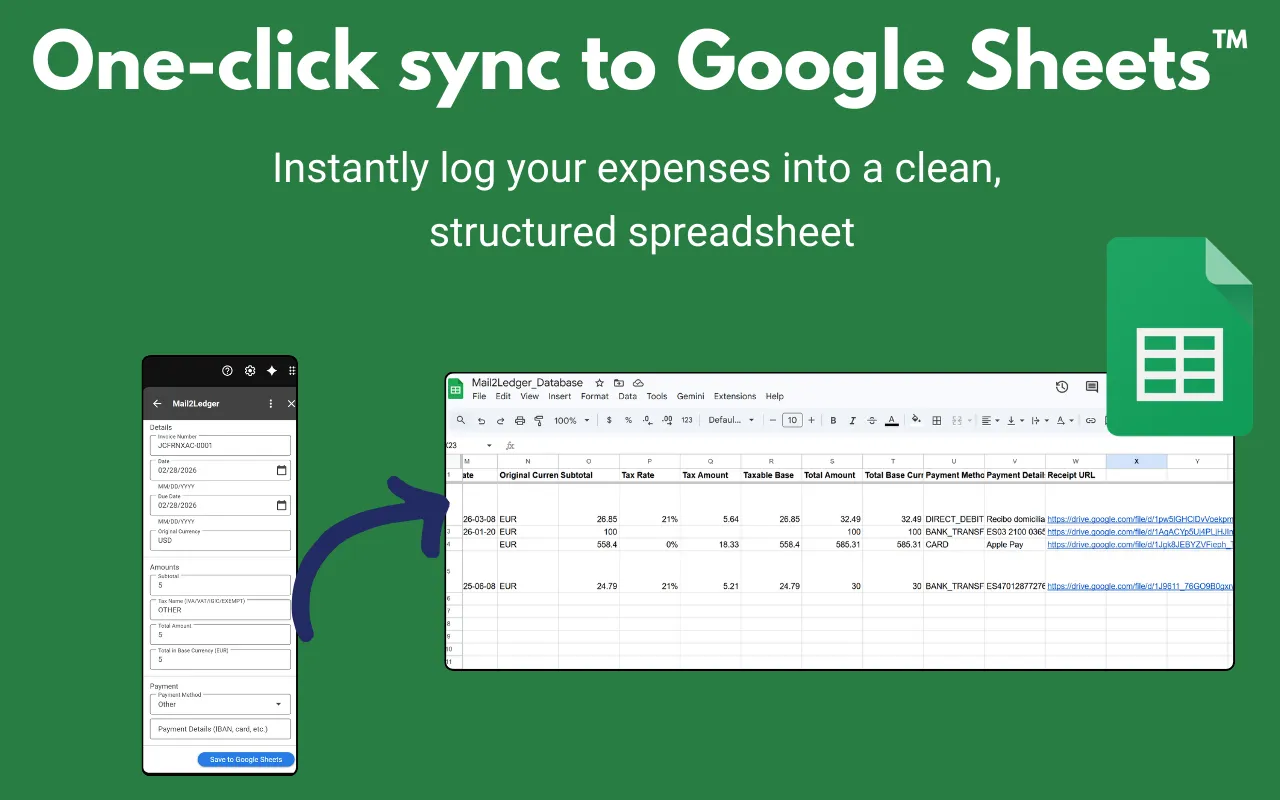 Mail2Ledger parsing a PDF and instantly syncing the structured row data to a connected Google Sheet.
Workflow implementation
Deploying Mail2Ledger requires zero coding or API configuration:
- Open an email containing a PDF invoice or receipt.
- Launch the Mail2Ledger add-on in the Gmail sidebar.
- Select your target Google Sheet and worksheet tab.
- Click extract. The add-on analyzes the attachment and appends a new row to your sheet in seconds.
If you are already optimizing your inbox workflows—perhaps by using AI to extract meeting links to your calendar—automating ledger inputs is the next logical step in reducing operational friction. You can also explore our free bookkeeping templates for virtual assistants to pair with this extraction method.
Ready to try?
Eliminate manual invoice data entry and fragile Zapier workflows. Mail2Ledger uses AI to parse your PDF attachments and sync them directly to your spreadsheets.
Install Mail2Ledger from the Google Workspace Marketplace (Free)