How to Track Quotes and Invoices in Gmail Without Adding a CRM
You sent the quote on Tuesday. Or was it Monday? You think the invoice for last month’s project went out, but you cannot remember if the client confirmed receipt. The follow-up you wanted to send next week is now this week, and you did not write it down anywhere.
This is the small-team admin trap, and it has nothing to do with how organised you are. Gmail is a fast-moving stream. Once a thread scrolls below the fold, it stops existing for your brain.
The standard advice is: get a CRM. Pipedrive, HubSpot, Copper, Folk. Sign up, import contacts, set pipelines, log every email. The pitch is that everything will sit in one place.
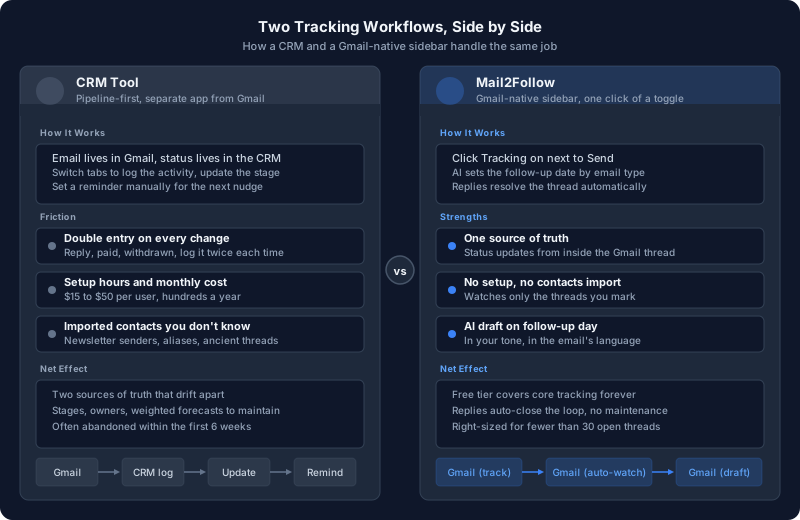
The reality, for anyone running fewer than thirty open threads at once, is that the CRM becomes the second place. Gmail is still where the conversation lives. The CRM is where you remember to log the conversation. That second step is exactly the friction that kills the system within six weeks.
This post is about the alternative: a way to track quotes and invoices in Gmail itself, costing nothing to start, watching only the threads you explicitly ask it to.
- Why solo and small-team work loses to CRMs
- The three hidden costs of running a CRM you don't really need
- The four things tracking actually has to do
- A Gmail-native stack that adds zero second tools
- A full quote walkthrough from send to signature
- A full invoice walkthrough from send to payment
- The honest signs you've outgrown lightweight tracking
The Two Tools Every Freelancer Eventually Cobbles Together
Anyone who has run a service business for more than a year ends up with the same two-tool stack: Gmail for everything, plus a side spreadsheet (or Notion table, or sticky notes app) for “open quotes” and “unpaid invoices.”
The spreadsheet is the part that breaks. It works for a week. It half-works for a month. By month three, half the rows are stale, two columns disagree, and a couple of paid invoices are still marked as pending.
The reason it breaks is not laziness. It is double entry. Every status change has to be remembered, switched to, and typed in. Replied? Update the row. Paid? Update the row. Withdrew the quote? Update the row. Multiply by every active thread and the friction wins.
A CRM solves this by being more elaborate, not less. More fields, more pipelines, more automations. For larger sales teams the volume justifies that elaboration. For one person, or two, the elaboration is the problem.
Why a Full CRM Is Overkill for Quotes and Invoices Alone
CRMs are built for sales teams whose primary unit of work is a deal: a multi-touch, multi-stakeholder process that benefits from being modelled. Stages. Owners. Forecasted close dates. Activity logs. Pipeline reports.
If you are sending five quotes a month and chasing three invoices, the model does not fit. Your “deal” is one email thread. Your “stage” is “did they reply yes or not.” Your “forecast” is your gut.
Three specific costs come up repeatedly when freelancers and small teams sign up for a CRM they do not really need:
Hours to import contacts, configure pipelines, hook up Gmail and Calendar integrations, create the custom fields that match your workflow.
$15 to $50 per user per month adds up to several hundred a year for a feature set you barely scratch.
Every reply, every confirmation, every withdrawn quote has to be logged in two places. Updates drift apart within weeks.
Sync your full Gmail history and you pull in thousands of contacts you have no relationship with, plus newsletter senders, plus your own email aliases.
For solo work, the cost-to-benefit math rarely lands. The honest version of “I should use a CRM” is usually “I want a place that nudges me to follow up on the right day.” That is a smaller problem than a CRM solves.
What Tracking a Quote or Invoice Actually Needs to Do
Strip out the CRM dressing and the actual job is small. A useful tracker for a sent quote or invoice has to do four things, and only four things, well:
Without manual data entry. The moment you press Send on a quote, the system already knows.
A quote is not an invoice. An invoice on its due date needs a different cadence from a quote that has been quiet for three days.
The follow-up should disappear automatically. Nobody wants to send a "just checking in" to someone who answered yesterday.
With a draft, not just a reminder. Reminders without drafts get snoozed.
That is the entire job. Anything beyond it is a CRM in disguise.
The Lightweight Stack: Gmail Plus One Sidebar
Mail2Follow is a Chrome extension built around exactly the four-job list above. It lives as a sidebar inside Gmail. There is nothing to log in to outside of Gmail, no second app, no second source of truth.
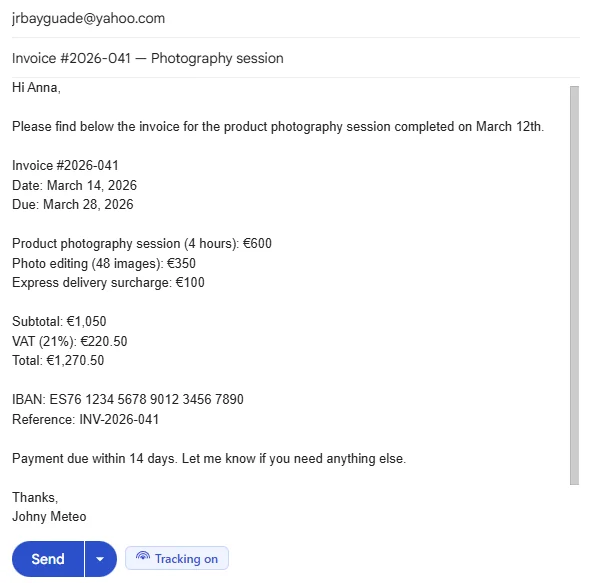
When you compose an outgoing email, a small “Tracking on” toggle appears next to the Send button. One click and the thread is watched. That click is the entire data-entry burden.
The sidebar groups every tracked thread by type, with a follow-up countdown on each card.
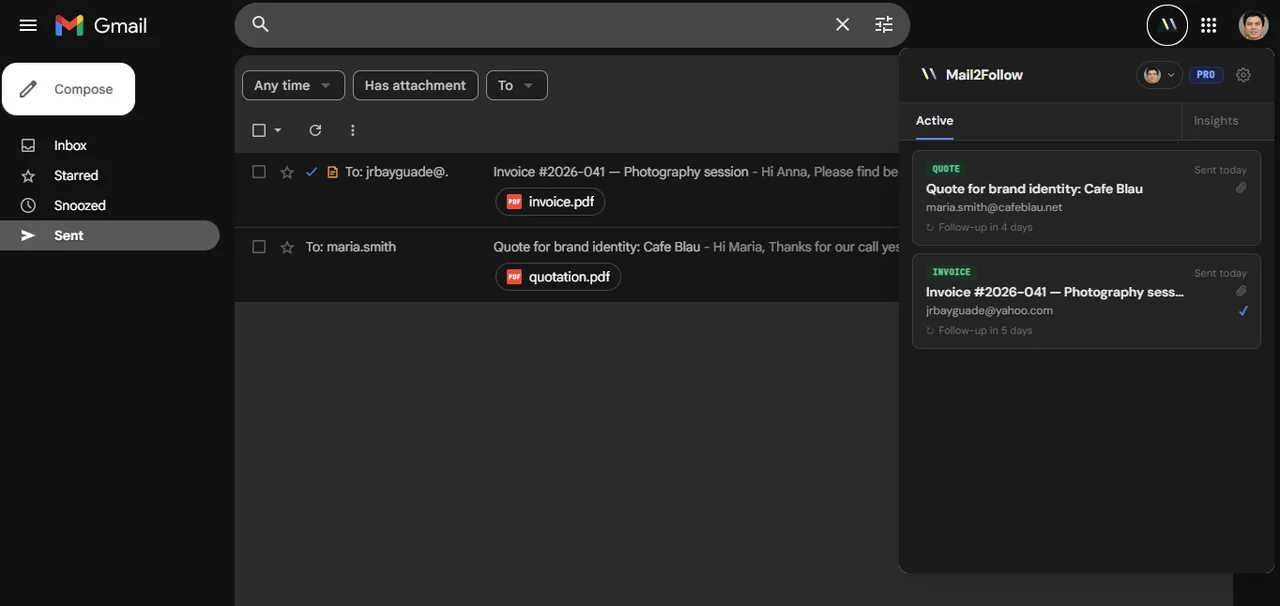
You see at a glance: two open items, one quote due to nudge in 4 days, one invoice due in 5. No spreadsheet, no second tab, no import job.
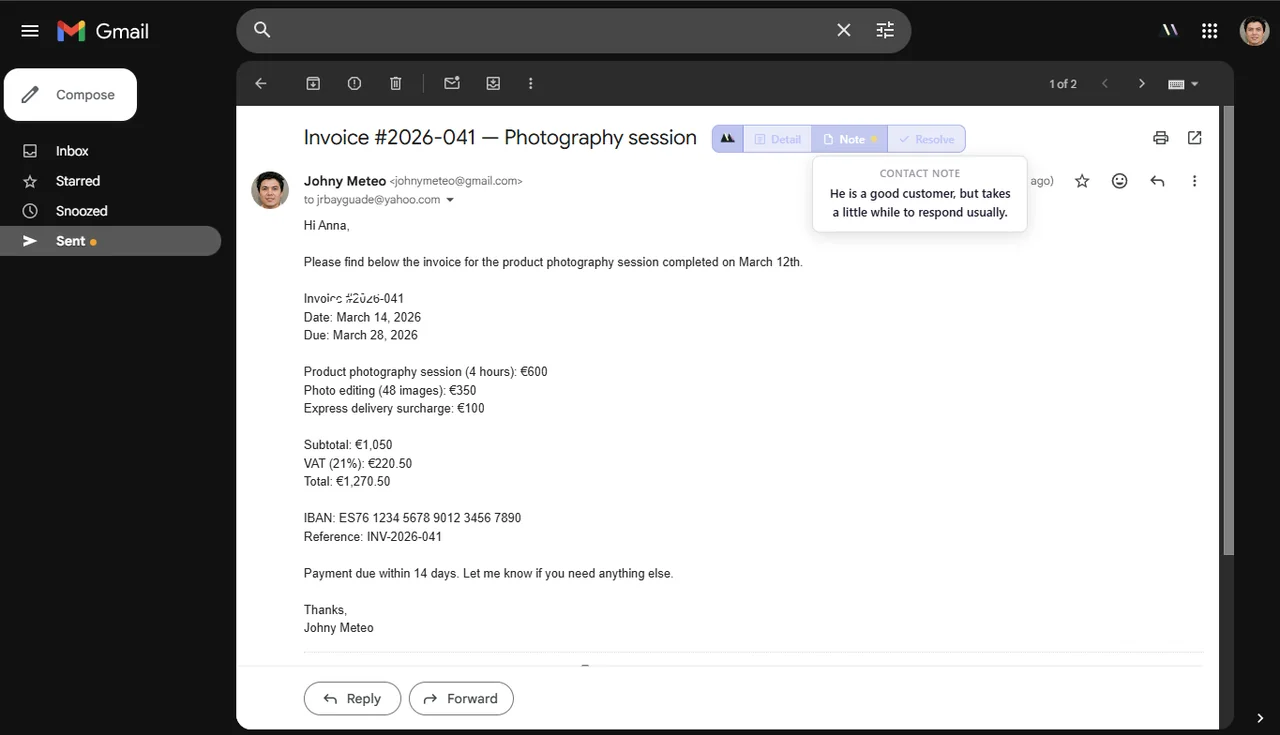
The right side of every tracked email gains three small actions: Detail, Note, and Resolve. They sit inside the Gmail thread itself, so updating status never requires leaving the conversation.
Walkthrough: Tracking a Quote From Send to Signature
Here is the full path for a quote, end to end.
You write the quote email as you would normally. Before pressing Send, the Tracking on pill is already lit by default. Send.
A small chip appears in the bottom corner: "Quote, AI suggests 4d, with quick options for 3d, 5d, 7d, 14d." The default is based on the email type the AI detected. You pick a different interval with one click, or accept the default and move on.
The thread is now watched. If the client replies on the thread, the follow-up resolves automatically and disappears from the Active list. There is nothing to update.
If no reply comes, the thread surfaces in the sidebar with a draft already written, in the same language and register as the original quote. You read it, change the one line that needs your specific knowledge, and press Send.

The whole sequence requires one decision (Send or not) at the start, and one decision (Send draft as-is or tweak) on follow-up day. No spreadsheet update has happened anywhere.
Walkthrough: Tracking an Invoice From Send to Payment
Invoices follow the same path with one difference: the cadence shifts.
When the AI detects an invoice email, the suggested follow-up is the due date plus a couple of days, not the standard 4 used for a quote. The chip in the corner shows “Invoice, AI suggests 5d” because invoices are time-sensitive in a way quotes are not.
Three things matter for invoice tracking specifically:
- Tone scaling by step. The first nudge is gentle (“In case it needs a forward to accounts”). The second, after another seven days, is firmer. The drafts auto-adjust depending on which step of the sequence you are on.
- Auto-resolve on confirmation. If the client replies “paid” or sends payment confirmation, marking the followup resolved is one click on the inline Resolve action.
- A note that survives the thread. If you know this client always pays late, you add a one-line note to the contact: “He is a good customer, but takes a little while to respond usually.” That note appears at the top of every future thread with the same person, so you do not retread the same context six months later.
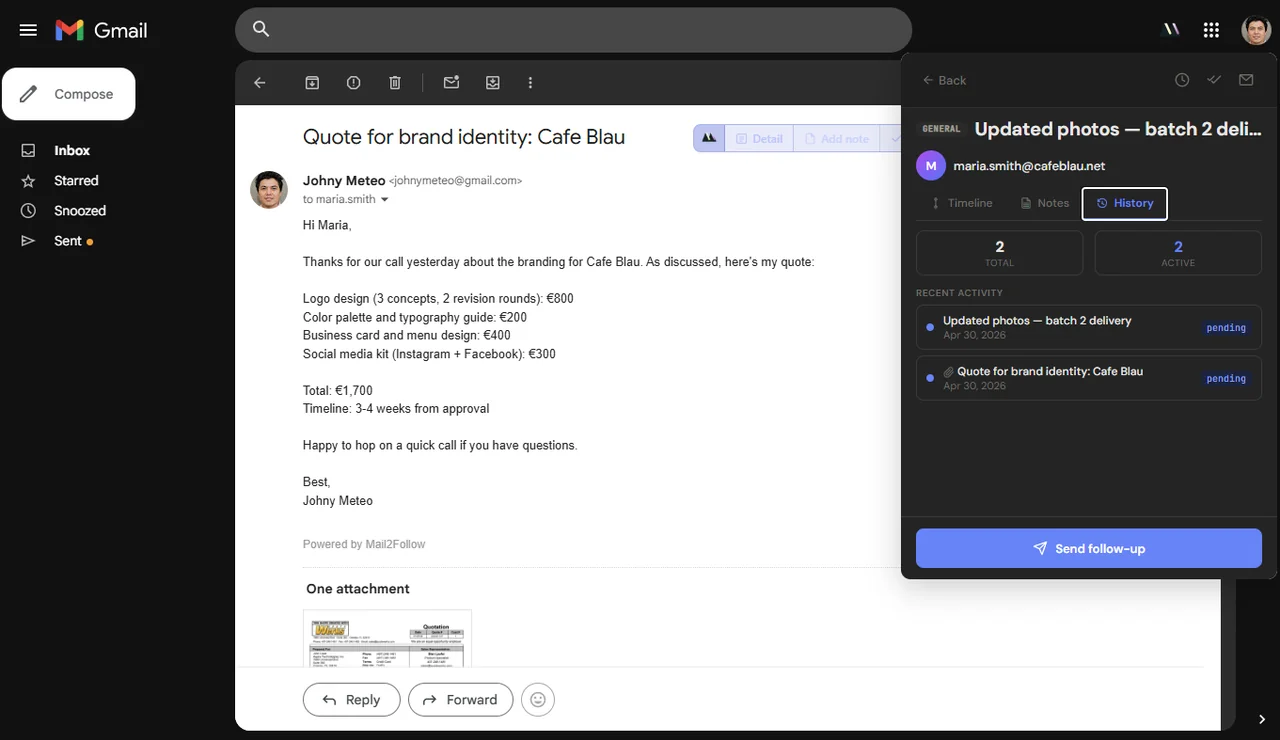
Stacking these three together gets you something a CRM gives you, memory of a relationship across threads, without ever leaving Gmail and without a contacts import job.
When You Actually Do Need a CRM
This post is not anti-CRM. CRMs solve real problems for the businesses they were built for. Roughly, you should reach for one when:
Multiple people working the same pipeline need shared visibility, ownership rules, and reporting. A sidebar in one person's Gmail does not solve that.
Lead to demo to proposal to legal to close, with different humans involved at each step, needs a model. A spreadsheet alternative breaks under that complexity.
If your week includes "what is the pipeline value" or "which deals close this quarter," you need stages, weighted values, and reports. Lightweight tracking does not produce those.
Six-month deals with five stakeholders need a real activity log with searchable history. Email-only memory is not enough at that scale.
If none of those apply, the lightweight stack will outlast any CRM you sign up for, simply because you will keep using it.
For the related problem of meetings agreed inside email but never landing in the calendar, Mail2Cal follows the same shape: read the thread, build the thing you meant to build, no extra app. And if writing the actual follow-up is where you get stuck, the post on following up on a quote without being annoying covers timing rules and full templates.
Frequently Asked Questions
Is Mail2Follow really free?
There is a free tier with the core tracking, AI follow-up dates, and reply detection. A Pro tier adds higher AI quotas, multi-step sequences, and contact notes. The free tier works indefinitely, no card required.
How is this different from a Gmail star or label system?
Stars and labels do not know when a reply arrives, do not suggest a follow-up date, do not draft the nudge, and do not surface threads on a specific day. They are static markers. Mail2Follow is dynamic: tracked threads change state automatically based on what the recipient does.
Will tracked emails show "Powered by Mail2Follow" or any branding to recipients?
The free tier adds a small footer to outgoing tracked emails. Pro removes it. Either way, no tracking pixels are inserted unless you explicitly turn on open tracking, which is a separate, opt-in feature for the Pro tier.
Can I use this with a custom domain or only @gmail.com?
It works with any Google Workspace account, including custom-domain Gmail ([email protected] hosted on Google). Signing in uses the same Google account you already use for Gmail.
What happens to my data if I uninstall the extension?
Tracking metadata is removed from the Mail2Follow servers when you uninstall and revoke access. The original emails remain in Gmail, untouched. There is no copy of the email body stored anywhere outside of Gmail.
Does it work with multiple Gmail accounts?
Yes. The extension detects which Google account is active in your current Gmail tab and tracks per-account. Switching tabs switches context automatically.
The Smallest Tracker That Actually Does the Job
The reason CRM adoption fails for solo and small-team work is not that the software is bad. It is that the software was built for a different size of problem. Five open quotes and three unpaid invoices do not need a pipeline. They need someone, or something, to remember the right day and surface the thread with a draft.
Mail2Follow does that one job, inside Gmail, with a single click of a Tracking on toggle. There is no import, no second login, no spreadsheet to keep in sync. It is the smallest possible tracker that still does the actual work, and the largest one most freelancers, consultants, and two-person agencies will ever need.
Free forever · 15 tracked emails / month · No credit card